
Stay up to date with the latest releases and features from Productboard. For information on our latest BETA releases, check out the article Productboard BETA releases.
Note: Subscription plan availability listed is based on availability at the time of release and is subject to change. Please visit the pricing page for the latest feature availability.
In this article:
June 2026
June 10, 2026
Changing teamspace type
You can now change a teamspace's type after it has been created. Admins and teamspace owners can update the type directly from teamspace settings, and existing content, members, and permissions remain intact throughout the transition. Access and visibility behavior update immediately based on the newly selected type.
June 16, 2026
Create and update PM entities in Spark
You can now create and update Productboard entities directly from a Spark conversation, without switching to the Productboard UI. Use plain language to create features, subfeatures, initiatives, objectives, key results, and releases, or update fields like name, status, owner, and description.
Spark previews exactly what will be created or changed before committing, and all operations respect your existing Productboard permissions.
June 15, 2026
Group by release group on boards
If your grid, timeline, or columns board has Release as its main item type, you can now group that board by Release group for better organization.
June 15, 2026
Editor usability improvements
You can now navigate, search, and collaborate more effectively in long documents. New tools include a document outline gutter, full-document search (Cmd/Ctrl+F), Selection-to-Spark, responsive comments, and simplified collaboration awareness.
June 9, 2026
Resources tab on initiatives and features
A dedicated Resources tab is now available on initiative and feature detail pages. You can link existing documents from a picker or create new ones directly from the tab. Spark users can also ask Spark to link any document in one step.
June 4, 2026
Deprecated: Sentiment analysis
The old sentiment system has been sunset in favor of the new and improved feedback analysis systems available or soon-to-be available with Productboard Spark.
June 4, 2026
Productboard MCP Server
You can now connect your coding agent to Productboard via MCP, so it can read product specs directly from Spark without copy-pasting or stale context. Once connected, the agent can search for and fetch specs, edit spec content, post and read comments, and update entity status. Available on all workspaces with Spark enabled.
June 4, 2026
Spark: Post-launch evaluation skill
You can now run a guided post-launch evaluation directly in Spark. Type
/post-launch-evaluation in any Spark chat to start a structured
review covering initiative summary, target metrics recap, quantitative analysis,
pre/post-launch feedback comparison, and a recommended next action. Spark generates
a post-launch evaluation document at the end of the flow.
June 3, 2026
Note creation in Spark
You can now ask Spark to create notes directly from your conversations. When you uncover valuable insights during analysis, Spark can save them as text notes in your workspace. Spark can also automatically tag these notes with existing workspace tags to help you organize and filter them later.
June 3, 2026
Version history: Diffs and specs
If you have Spark, version history now shows exactly what changed with additions and deletions highlighted directly in the document body when you browse past versions.
This is available in documents and on the specification tab on supported entities, but again, only if your workspace has access to Spark.
June 3, 2026
Connect Braintrust to Spark via MCP
Braintrust MCP connection is now supported.
June 2, 2026
Spark can read entities on boards
You can now add any board to a Spark conversation as context. Spark reads every entity on the board, including statuses, owners, timeframes, descriptions, and custom fields, so you can ask questions, generate summaries, and take action across your entire roadmap or feature list. To add a board, @mention it in Spark, paste a board URL, or select "Add to Spark" from the board's context menu.
May 2026
May 28, 2026
The Company Knowledge section replaces Spark's Context folder
Productboard now has a dedicated home for company-level product context called Company Knowledge, which lives near the top of the submenu. From here, you can browse and reference company context from anywhere in Productboard. Admins can curate and manage the content, creating a single source of truth that improves the quality of Spark's outputs.
Any existing data from the older Context folder, including templates, competitors, and personas, have been migrated to the Company Knowledge section.
May 27, 2026
Spark: Admin rollout controls
- Visible to everyone (default) — all users
- Visible to admins only — configure and test before your team sees anything
- Hidden for everyone — suppress Spark in a specific subspace
May 27, 2026
Spark: Hybrid document search
You can now search Spark documents using both keyword and semantic matching. This hybrid approach combines traditional keyword searches with AI-powered semantic understanding to help you find relevant content more effectively.
May 27, 2026
Spark context setup
Spark can now guide you through connecting external context directly in your conversation. When Spark needs integrations, files, or MCP servers to help you, it prompts you to set them up inline instead of requiring you to hunt through settings pages. You can connect integrations like Notion or Google Drive, upload files from your device, or set up MCP connectors right when Spark asks for them.
May 19, 2026
Write specs with colleagues and Spark
You can now write and refine product specifications directly in Productboard using the new Specification tab, available from the sidebars of initiatives, features, and subfeatures.
The tab is a free-form rich-text editor where you can draft specs, collaborate with teammates in real time, and ask Spark to write or improve content without leaving the entity.
Specification content doesn't sync with Jira, Azure DevOps, or other delivery integrations, so you can iterate freely.
May 18, 2026
Search and explore PM entities in Spark
You can now search for and explore your product entities directly in Spark. Type in a natural language query (for example, "find all features in delivery where effort is more than 10") and Spark returns matching features, initiatives, releases, key results, and more.
You can also ask Spark to read relationships between entities and traverse hierarchies, making it easy to answer questions like "what features are in the 17.0 release?" or "give me a status report on our Q1 objectives, including their key results and associated initiatives."
May 15, 2026
Boards load and filter faster
We've made significant improvements to the way board data is filtered and displayed. Essentially, the more filters a board has, the faster it will load. This improves load times for large boards by about 10x on average.
This performance increase will roll out gradually.
Note sorting on insights boards
You can now explicitly control the sort order of notes on any insights board by choosing whether your most recently updated or most recently created notes are at the top or the bottom of the list.
May 13, 2026
Scheduled tasks in Spark
You can now schedule Spark to run recurring PM workflows automatically. Create a scheduled task from the Home menu sidebar, choose a one-time or recurring cadence, and Spark handles the rest. Completed runs appear as new chats, and you'll receive a notification when each run finishes — so competitive scans, feedback digests, and strategy reviews happen on schedule without manual effort.
May 8, 2026
Skills replace Jobs in Spark
Spark now runs entirely on Skills. The familiar cards on Spark Home look and work the same, but they now invoke Skills instead of Jobs, bringing more consistent and capable AI performance to your existing workflows. With this change, there's no longer a distinction between "Jobs" and "Skills" in Spark — Skills is now the single AI execution model throughout the product.
May 7, 2026
Spark: Current user awareness
You can now see which users are currently active in Spark. This awareness helps you identify who's online and track user activity in real-time.
May 6, 2026
Last updated field
You can now see when documents were last modified with the new Last updated field. This field appears in document lists and helps you quickly identify which documents contain the most recent information.
April 2026
April 28, 2026
Spark skills
Spark now supports skills — custom, reusable instructions that extend what the AI agent can do. Create personal skills that teach Spark new workflows, automate repetitive prompts, and package domain knowledge into reusable commands. Skills are invoked automatically based on context, or triggered manually via /slash commands.
- Personal skills: Create and manage skills visible only to you.
- Space-level skills: Admins can create or promote skills to the workspace so all users can access them.
- Productboard system skills: Bundled defaults for skill creation, spec generation, and competitive analysis.
-
Flexible creation: Add skill prompts manually, upload
.skillpackages, or use Spark's built-in/create-skillcommand. - Script and resource support: Attach Python or shell scripts that run in a sandbox, and bundle static data files your scripts can reference.
April 27, 2026
Granular accept/reject for Spark AI edits
You can now review Spark-generated document edits as individual tracked suggestions, accepting or rejecting them one at a time, in bulk, or by selection. Suggestions persist across refreshes and tabs, and all collaborators see updates in real time.
April 24, 2026
Notes count column on Customers board
A notes count column is now available by default on the Customers board, and can be added to any board where companies or users are a primary item. You can use this column to quickly see the total number of notes for each company or user, and click into the cell to jump straight to the Notes tab in the sidebar.
Table of contents block in documents
You can now add an auto-generated table of contents block to any Productboard document, making it easy to navigate long PRDs, specs, and briefs without endless scrolling.
April 23, 2026
Better @-mention searching
We've made some improvements to the way data is loaded and surfaced when searching names in the @-mention menu. The list should be faster and more intelligent now.
API: Advanced search and field options management
Two much-requested improvements to the public API:
-
Advanced search by field value: The search entities endpoint now accepts a
data.filter.fieldsbody parameter, so you can filter entities server-side by the value of any filterable field (custom or default) across all 11 supported entity types. No more pulling large result sets just to filter them client-side. - Full options management for select & tag fields: New endpoints to create, update, and delete options on single-select, multi-select, and tag fields. You can now manage your taxonomy programmatically — perfect for tag governance, bulk cleanup, or syncing with an external system of record.
April 15, 2026
Spark beta: Spec job
We've added a new core job to Spark. Now you can turn a problem statement or brief into an engineering-ready spec in under 30 minutes. Spark walks you through the process without inventing answers where context is missing.
Spark beta: New integrations (GitHub and public documentation)
You can now get instant, accurate answers about how your product works today — sourced directly from production code and your public documentation — without waiting for an engineer or digging through dozens of articles.
April 9, 2026
Status column on grids
You can now visualize item statuses in a grid column. This makes your statuses much easier to read for those who are less familiar with your status color assignments, and for those who are color-blind.
April 8, 2026
Customer Importance Score in formulas
You can now include the Customer Importance Score (CIS) directly in your formula calculations, bringing real customer demand signals into your scoring models alongside other fields.
April 7, 2026
Teams field for products and components
You can now assign teams to products and components. This also comes with some improvements to the filtering system to make it easier to work with teams, products, and components together.
April 2, 2026
Map multiple forms to a single touchpoint
You can now assign more than one form to each touchpoint in your workspace (the manual Create insight button or the Submit idea button on any portal). This allows you to provide internal users with different forms to fill out depending on the sort of feedback they have to contribute.
March 2026
March 23, 2026
Make boards private within teamspaces
You can now hide boards, making them invisible within their teamspaces except to individual members you specify (and to admins).
Comments remain after anchor text is deleted
Comments in documents now remain visible and accessible after their related text is deleted, allowing you to review, respond to, and manually resolve them when appropriate, and to confidently accept AI edits to existing documents without fear of losing peripheral conversations.
Reveal most archived items easier
We've change the way you view archived items on grids, timelines, and columns boards. Before, you had to apply a filter to reveal archived items, which was clunky and confusing. Today, you can access specific archival visibility options in Board controls.
March 18, 2026
Legacy Productboard deprecated
There is now only one version of Productboard (the better version!). Legacy roadmaps, features boards, and other obsolete interfaces are inaccessible now. Thanks for sticking with us!
Documents: Copy link to block
You can now copy a link to a specific block by clicking the block's handle. This is great for pointing members with access toward a specific part of your document.
Add initiative shortcuts to teamspaces
You can now add shortcuts to initiatives the same way you can add shortcuts to boards, allowing you to quickly access them from within a teamspace's navigation menu.
March 16, 2026
Time horizons and end-date visualizations on grid columns
We've added an option to the timeframe visualization column on grid boards that allows you to snap your items' visualization bars to time horizons (in the same way you can do so on dedicated timeline boards).
March 4, 2026
Filters in grid columns
From the ••• More actions button in any column header, you can now instantly add or modify filters specific to that column. Filters applied from columns automatically sync with the main board filters, maintaining consistency while providing flexible access points.
February 2026
February 26, 2026
Time horizons and end date visualization on timelines
You can now activate time horizons to automatically adjust the size of each item card to fit your timeline roadmap's chosen unit of time. For example, if your timeline is set to display months, each item will take up at least one full month on the roadmap.
This allows you to build high-level timeline roadmaps for stakeholders who value readability over granularity.
February 19, 2026
Paste URLs into Spark: Notion and Confluence
You can now paste a Notion or Confluence URL directly into the Spark chat input. The URL automatically transforms into a visual chip displaying the document title and source icon. This document content is immediately added to the conversation context, ready for Spark to reference in its responses.
February 18, 2026
File attachments on New boards
You can now upload files to notes and feature descriptions on New boards in several ways, just like you could with the older Legacy boards. This makes migrating from Legacy Productboard much easier and reduces friction when working with non-Productboard files.
February 16, 2026
Null values in formulas
Formulas now automatically handle null values by treating them as zero. You no longer have to manually populate values before anything computes.
February 11, 2026
Hierarchy column on grids
You can now view the immediate parent of an entity in a column on a grid. This allows you to quickly scan for hierarchy relationships and edit them easily from the column if you wish.
February 5, 2026
Required fields
With Required Fields, customers can define exactly which information must be captured before a feature progresses to the next workflow step. Incomplete items are flagged early, reducing bottlenecks and ensuring consistent data quality across teams and workstreams. Everyone knows what’s needed—and when.
February 3, 2026
Import call recordings automatically from Gong
Gong call recordings capture your customers’ most genuine feedback, from enthusiastic requests to candid pain points, all in users’ own words. Now you can bring all those insights directly into Productboard.
The new Gong integration automatically imports call transcripts as Productboard feedback notes, linking each one to the right customer record so your product decisions stay grounded in real conversations.
Link documents to initiatives
You can now connect initiatives to supporting documents directly from the initiative's details sidebar. This allows much easier access to relevant documentation while browsing through your initiatives.
In the future, other item types will be supported.
February 2, 2026
Shift + drag shortcut on timelines
You can now hold Shift while dragging an item around on a timeline to adjust its vertical position without changing its timeframe.
Effort field rollups
Effort fields now automatically calculate their values based on the values of their children. This calculation is consistent anywhere it's visible, including grid columns and roadmap card attributes.
You can still override automatic effort calculation with manually-input values. Doing so disables the rollup function for that item, but you can re-enable it easily.
Convert document text into entities
You can now highlight a piece of text in a document and convert it into a feature, initiative, or other type of work item. You can even create many items at once by converting an numbered or bulleted list.
This makes it easier to bring the ideas you brainstorm out into your workspace where they can be properly developed.
Share documents from your Personal section
You can now grant colleagues access to documents which live in your Personal section. This makes it easier to collaborate on drafts that aren't yet ready to be shared with a wider audience in a teamspace.
We've also added two new tabs to the Boards page: Shared by me and Shared with me help you manage your shared Personal documents and view those shared by others.
January 2026
January 26, 2026
Shareable timelines and columns boards
You can now share your roadmaps with customers, external partners, and colleagues not invited into Productboard. It’s a simple way to keep your most important stakeholders informed about what's coming next.
You can provide access to published timelines and columns boards with a link or by embedding them into your website, intranet, or elsewhere.
You can even password-protect them!
January 14, 2026
Search flow improvements
We've made some improvements to the way search results are presented. Now, when you use the search bar at the top of a board, results will be split into two groups based on whether they're being filtered out of the current board.
This helps you quickly locate relevant items without leaving your current workflow.
January 12, 2026
Aggregated customer fields
When a custom number field is assigned to a Company or User item type, it becomes an aggregated customer field. For example, you can now create a "Total ARR" field that helps you compare the amount of ARR associated with all the customers who have expressed interest in a given feature.
Note: Aggregated customer field availability is tied to the same architecture that drives the new Customers board detailed below. You won't be able to use aggregated fields until your workspace's Customer board migration is complete. Please bear with us!
New Customers board for all users
Over the past several weeks, many users have had access to the beta version of the improved Customers board experience. Today, the new Customers board is released in full, and we have begun rolling it out to all remaining users.
This release also includes a few upgrades, like the ability to add custom fields and Salesforce fields to the Customers board. It also upgrades Companies and Users to full entities, meaning they can have fields assigned to them just like other item types like features and releases.
Migration is automatic and should be complete within a few weeks.
January 8, 2026
Portal column on grids
You can now add the Portals column to any grid. This lets you quickly see which items have been assigned to which portals without having to dig through item details.
You can also hover over the portals assigned to a specific item to see where that item's card lives in each portal, and you can click Manage Portal postings to immediately make changes if you wish.
December 2025
December 17th, 2025
Read and download Legacy-era item attachments on New boards
You can now view and download files attached to items on New boards, rather than having to switch to Legacy boards just to view those items.
The ability to actually upload new items as attachments is not ready yet, but it's on the way. Hang in there!
December 16th, 2025
Customize status values of all item types
You can now change add, edit, and delete status values for all item types which have statuses (features, subfeatures, releases, objectives, initiatives, and key results. You can do this from Settings > Item customization.
November 2025
November 26th, 2025
Jira item mapping improvements
We've made the following improvements to the Jira integration:
- You can now map Jira priority fields to Productboard single-select fields.
- You can now map more types of date fields from Jira (previously only due date could be mapped).
- You can map those Jira date fields to custom date fields in Productboard (instead of just the timeframe field).
- We've expanded the number of mapped field types that can be Jira-managed from one to eight, including radio buttons, multi-check boxes, and multi-group picker fields.
Customize more portal colors
You can now customize the visual appearance of your portals to match your brand identity—including portal font color, primary color, card background color, and background color. These customizations are especially helpful when embedding a Portal within your application or website.
November 24th, 2025
AI-suggested insights with Productboard Pulse
Productboard can now automatically identify key insights within a piece of feedback. You'll see these highlighted in feedback notes, making them faster to peruse and easier to zero in on the most important parts.
November 19th, 2025
API ID on the entity sidebar
You can now easily copy any entity's ID from the ••• More actions menu in its sidebar, meaning you no longer have to use the /search or /list endpoint to get the entity by name.
November 18th, 2025
Custom roles can now control themes and topics
You can now grant custom roles the ability to create, edit, and delete themes and topics.
November 17th, 2025
Insights automation: Link notes to items
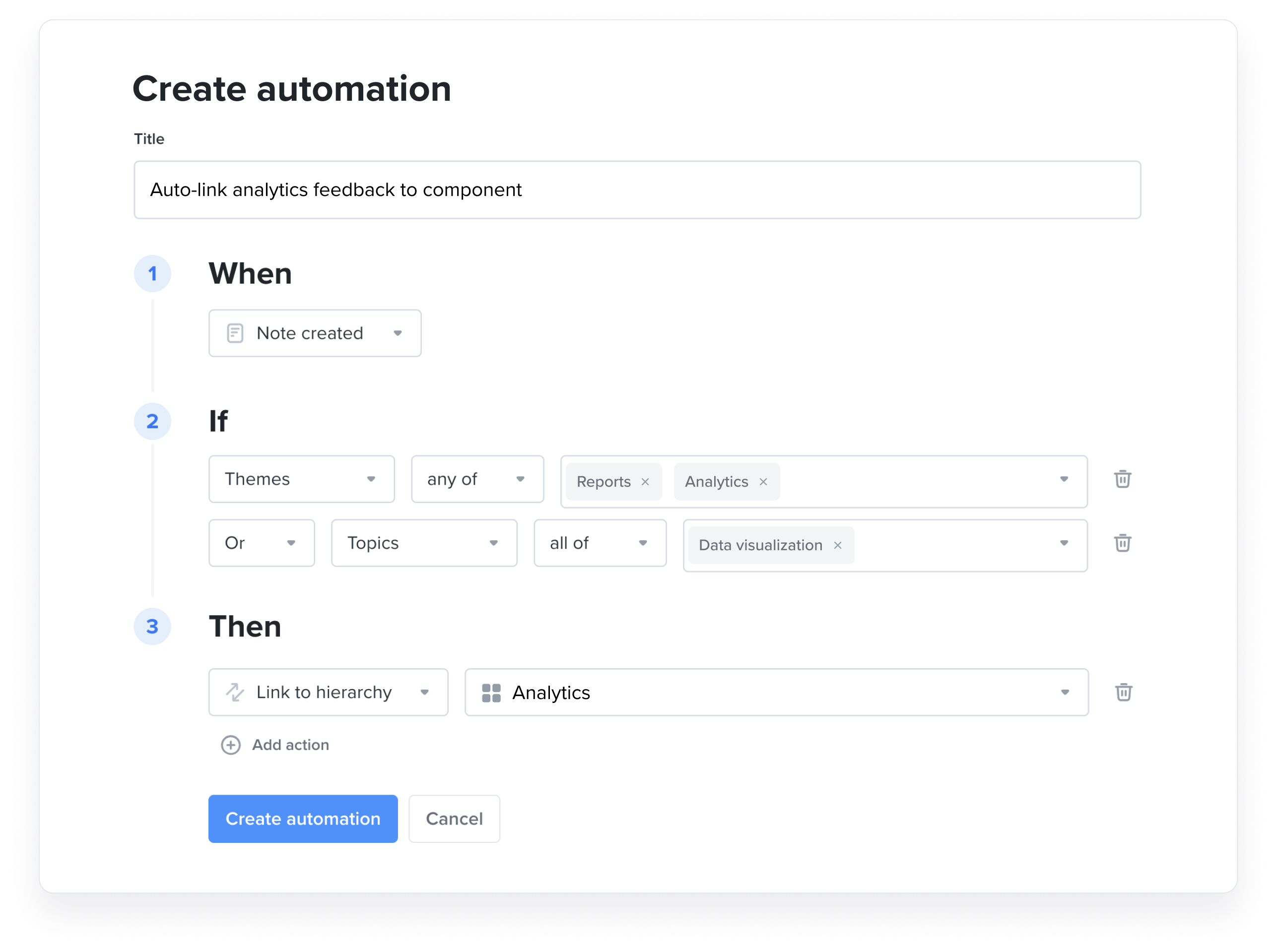
You can now set up rule-based automations to link incoming feedback notes of a certain theme, topic, tag (or other specified criteria) to a designated entity in your product hierarchy (such as a specific component, feature, or subfeature). For example, all new notes with an AI-detected theme of "analytics integrations" could be linked to an "Analytics" component in your product hierarchy.
This will make it easier to browse related feedback when reviewing hierarchy items, or re-assign those feedback notes to underlying feature ideas. This in turn will ensure those insights are factored into Customer Importance Scores and can be put to use in prioritizing the features that customers need most. It also provides a more complete picture of which features have been requested by any given customer.
November 5th, 2025
Multi-Factor Authentication
Multi-Factor Authentication (MFA) adds an extra layer of security to your workspace by requiring users to verify their identity during sign-up and login. This helps protect your company’s data and ensures only authorized users have access to your workspace.
October 2025
October 30th, 2025
Receive notifications when a note you created is processed
Previously, you would be notified when an insight was created based on a note you submitted. Now, you'll also be notified when any note you created is marked as Processed. This makes it easier for you to stay in the loop instead of waiting and wondering if anyone's read your feedback yet.
To be clear: this uses the existing notification system, so only members of your Productboard workspace will receive these notifications.
October 27th, 2025
Duplicate items on New boards
You can now duplicate entities in the new Productboard experience, including products, components, features, initiatives, and objectives.
This means you no longer have to create a new item from scratch and manually copy-paste data into it, saving you tons of time.
October 22, 2025
Rename item types across your workspace
You can now customize the names of Productboard's core entities to fit your organization's terminology and conventions, no matter what methodologies you might be using.
This is important if it's a priority to align the terminology of entities in Productboard with those used in another integrated system, like Jira or Azure DevOps.
You can rename products, components, objectives, key results, initiatives, releases, release groups, features, and subfeatures.
Simple filters by release
Today when you add a new filter, you're greeted with the most common filter types. We've added filtering by release to this initial set of options! This saves you from having to access More filter options, allowing you to apply these filters in fewer clicks and with less cognitive overhead.
October 15, 2025
Configurable form submissions
You can now map forms to specific internal touchpoints throughout your workspace, including the manual Create insight button and the Submit idea button on portals (though users will only see the form if they're signed into your Productboard workspace, meaning external portal visitors can't fill out forms yet).
Also, there are a few new form field options available:
- Date
- Single-select
- Multi-select
October 8, 2025
Custom roles can now control teams
You can now grant custom roles the ability to create, edit, and delete teams.
October 1, 2025
Timeframe visualization column on grids
This new field adds your timeframe data to the grid as a mini Gantt chart, making it easy to compare timeframes across many items. This is particularly useful for seeing how work lines up with concurrent projects, which is critical for quarterly planning and other strategic activities.
September 2025
September 23, 2025
Grouping items on grids
You can now group items horizontally on grid boards. This means you can divide your items into categories based on their field values or hierarchical position, making it easier to visualize many items on one board.
September 22, 2025
Consolidated columns on grids
Releases, initiatives, and objectives can now be displayed as single, consolidated columns on grids. This allows you to view and manage their relationships to other items without having to add a bunch of columns.
Favoriting initiatives
You can now add initiatives to your Favorites section for easy access.
Minor filter UI improvements
A set of small updates to make filtering more intuitive. It should now take you fewer clicks to configure filters. For example, when building a multi-select filter, there's now a Select all button so you don't have to click each value individually. Neat!
Create new items directly from the main menu
The Create button at the top of the main menu now allows you to create items like features, releases, and components, in addition to boards. This lets you create things as soon as you think of them without having to navigate away from whatever you were doing.
September 11, 2025
Grouping by all entity types
We’ve released an important enhancement to the way grouping works on new column boards that will help facilitate release and sprint planning when you are planning both parent and child entities at once (e.g. initiatives and features, or features and subfeatures).
This includes a new hide indirectly linked items button to give you more control over what appears on your boards.
September 10, 2025
Productboard item previews in Slack
When you paste a link to a Productboard item into Slack, the link will now unfurl to display the item's name and some key information about it. These previews respect Productboard permissions, which means only people with access to the item in Productboard will see the preview in Slack.
Converting more entities on New boards
Previously, on New boards, you could only convert objectives into initiatives. You can now convert features into components or subfeatures, and convert initiatives to features. All these conversions are reversable.
September 4. 2025
Themes for Pro+ users
Themes are no longer limited to Productboard Pulse customers!
A theme is a user-defined category that groups feedback notes together based on filters. You can create themes from a template or from scratch, and once set, any note that matches a theme's filters will be added to that theme. This makes them great for discovering and analyzing feedback trends in workspaces with many notes.
Note: Themes are an upgraded form of the older Topics functionality. If you're used to working with topics, you already understand themes!
Enhanced analytics visualization for Pro+ users
Enhanced analytics are no longer limited to Productboard Pulse customers!
The analytics layout of any insights board can now be configured using Board controls, similar to other board types. You can also save configurations as separate boards and specify what sorts of metrics you'd like to track.
Embed analytics into documents
You can now embed analytical charts and dashboards directly into your collaborative documents. This powerful feature allows product managers to visualize data from external analytics tools, making it easier to evaluate and measure the success of released capabilities without switching between platforms.
September 1, 2025
Beta: Customer boards on the New experience
Customer boards have been brought into the New experience for select users! This board is perfect for viewing and comparing the needs of your customers.
August 2025
August 22, 2025
Automatically follow items when insights are created
When a note is linked to an item in your product hierarchy (that is, when it's used to create an insight), anyone who follows that note will automatically be made a follower of the linked item. This makes it easier to follow requests through the development lifecycle.
August 18. 2025
Contributors can now edit documents
Contributors can now be granted permission to write, edit, and format text within documents. This makes it easier to collaborate on documents with all stakeholders within Productboard.
August 7, 2025
Export timelines and columns boards as images
You can now export New experience roadmaps as .png files. This is great for putting roadmap updates into a deck or analyzing the outcome of a sprint during a retrospective.
July 2025
July 3, 2025
Search location on timelines and columns boards
When you search for an item on a timeline or columns board, you'll be taken to that item so you can see its location. This works even if the item you're looking for is nested inside a collapsed parent item or not yet loaded on the board (for example, far in the past on a timeline).
This release brings the search function up to parity with grid boards.
June 2025
June 30, 2025
Productboard Pulse: Themes and improvements to feedback analytics
Themes are user-defined categories that group feedback notes together based on Productboard AI's natural-language interpretation of a given description. They make feedback categorization and analysis at scale much easier.
To complement this new feature, we've modernized the insights board analytics layout.
Attribute mentions in documents
You can now add Health and Description tooltips to certain mentioned entities like features and initiatives on a per-document basis.
June 25, 2025
Teamspace data visibility: drivers and integrations
Admins and teamspace owners can now manage the visibility of drivers and integration fields within teamspaces.
June 19, 2025
Local reordering of field-based columns and swimlanes
Groupings based on data fields (like Status, Health, or Task) can now be reordered by dragging and dropping on the board or in Board controls, or by using the ••• More actions button beside a group's name on the board. Reordering such a grouping on one board will not affect groupings or orderings on other boards.
Collapsing swimlanes on columns boards
It is now possible to collapse swimlanes on columns boards in addition to timelines, allowing you to reduce visual clutter on busy roadmaps.
June 18, 2025
Sync Jira issues without using webhooks
You can now use a polling-based method for importing and updating Jira issues within Productboard instead of relying on webhooks. This is great if you've got restrictions on the use of webhooks in your Jira Cloud workflow.
June 17, 2025
Follow items on New boards
You can now follow entities (like features, initiatives, or releases) on New experience boards (like grids, timelines, and columns boards). Following these items allows you to receive notifications when certain changes are made to them.
Streamlined board duplication
When you duplicate a board, you are now asked where you'd like the new copy to go (instead of having to move the new copy in a separate set of actions.
June 11, 2025
Jira integration: Better initiative field syncing
Two-way syncing is now available for all initiative fields.
May 2025
May 16, 2025
Teamspace data visibility
Admins and teamspace owners can now control the visibility of certain data fields within teamspaces they manage. This can help reduce clutter in large workspaces with many teams.
May 12, 2025
Manual grouping visibility on timelines and columns boards
You now have manual control over which groups are visible, making it easier to declutter your roadmap or move items between swimlanes on a kanban board.
May 6, 2025
Bulk actions on New boards
You can now select and edit multiple items at once using the checkboxes beside their names. Many data fields can be edited in this way, including timelines and custom fields.
May 1, 2025
Sync Jira components to Productboard custom fields
You can now sync Jira components to multi-select fields in Productboard. You can also set this mapping to sync via the new Managed field option, making the Productboard side of the integrated field read-only.
April 2025
April 29, 2025
Simple filters now support drivers and tasks
Simple filters can now handle drivers and tasks, saving you from having to set up an advanced filter to handle them.
Salesforce integration: Automatic account syncing
Salesforce accounts can now sync seamlessly without the need for manual uploads or intervention, saving you time and keeping customer data up-to-date.
April 25, 2025
Simple filters now support custom fields
Simple filters can now handle custom fields, saving you from having to set up an advanced filter to handle them.
April 15, 2025
New Productboard experience GA
We’ve reimagined Productboard to better support product teams at every stage—from strategic planning to day-to-day execution. The New experience is now available to all users, no opt-in required.
Main navigation updates
Productboard's main navigation area has been updated to improve navigability, extensibility, and ease-of-use. No functionality has been removed, but things you're used to seeing in one place may have moved to another.
Simple filters on New boards
You can now use simplified filters on grids, timelines, and columns boards that are faster and easier to set up than the pre-existing advanced filters. Those advanced filters remain available to support more complex workflows.
April 7, 2025
Entity swimlane reordering on New boards
You can now reorder swimlanes based on releases, initiatives, products, components, and objectives by dragging them around on your boards or from the Groupings section in Board controls.
Salesforce opportunity import: Open opportunities now supported
You are no longer limited to importing closed opportunities from Salesforce. Productboard notes based on open opportunities will update in real time as they're edited in Salesforce, including changing from open to closed.
Salesforce company import: "OR" filter and filter groups
You can now choose between joining filters with ‘AND’ or ‘OR’ when configuring account imports into Productboard from Salesforce. You can also add filter groups for complex filtering logic.
Note CSV importer: New date column
You can now include date and time information when importing notes from a spreadsheet. The new column header is included in the sample CSV and Excel files for you to use.
Contributors can now create users
Previously, contributors were only able to add companies, and not new users, to notes. Going forward, if a user has not yet been added to the Productboard database, contributors can add them.
March 2025
March 24, 2025
Productboard Pulse: AI agent awareness upgrade
The AI powering Productboard Pulse's insights report generation can now recognize @-mentions of customers, users, and segments, and adjust its responses accordingly.
March 4,2025
Productboard Pulse AI Agent for Slack
This integration enables product teams to analyze customer feedback, co-author voice of customer documents, and share insights seamlessly—all without leaving Slack.
March 3, 2025
Exporting filtered feature and column data from a grid
You can now set up filters and columns on a grid and then export the contents of that grid to a CSV file using a button in Productboard. This export maintains the filters and column data, allowing you to create more specific exports.
February 2025
February 19, 2025
Custom roles: Feature data visibility
As a Product Operations Director, I would like my Engineers to only update Feature Timeframe, Effort, and other Engineer relevant fields so that I can ensure data health & maintain data governance.
We've enhanced custom roles. Now you can specify which fields are visible within the feature details sidebar for any given custom role. This allows you to tailor roles to specific personas and their responsibilities within your organization by hiding irrelevant fields.
January 2025
January 31, 2025
Tasks added to New experience
You can now add tasks as columns to grid boards and edit them from the dedicated Tasks page in the Data section.
January 30, 2025
Automatic health status roll-up
Health statuses now automatically roll up to parent items. This behavior can be overwritten manually.
January 29, 2025
Color coding on New roadmaps
You can now color code any main item on a timeline or columns board according to certain field types, like health or custom select field values.
November 2024
November 12, 2024
Custom roles
As a Product Operations Director, I would like to place a restriction on who can create, edit and delete some of the data fields within PB; So that I have control over our internal process, and consistency in operations.
We've spoken to many product-operational experts that use Productboard today. The vast majority, especially those in larger organizations, needed control of the "master data" used throughout their workspace. They needed this to ensure internal processes and operational consistency.
With custom roles, you can now govern the data that can be used throughout your workspace. No more members creating custom fields that cause confusion with existing custom fields. No more members creating their own release groups, against company process. No more randomly created products, objectives or initiatives.
November 4, 2024
SCIM group provisioning
We've enhanced our SCIM API integrations to support group provisioning through Microsoft Entra ID and Okta.
October 2024
October 23, 2024
Tag support for features on New boards
You can now apply and filter for tags attached to features when working on grids, timelines, and columns boards.
October 14, 2024
Hide empty items
There is now a box in the Items section of Board controls that, when checked, will hide any items which have no visible subordinate items according to the board's filter.
September 2024
September 17, 2024
Resize columns on grid boards
Click and drag the edge of a column to adjust its width, making things clear and navigable.
September 13, 2024
Card attributes for timelines and columns boards: Custom fields
This unlocks new visualization use cases such as: Member, Custom date, Single select, Multiselect, Number, and Text.
September 8, 2024
Import features from CSV to New boards
Customers who have feature ideas living in a spreadsheet or other tools that export to CSV can import those features in Productboard on the new boards (grid, timeline, column roadmap).
Company and Segment CIS columns on grid boards
View aggregated CIS data by specific company or groups of companies to help you make decisions about what to build next.
August 2024
August 28, 2024
Card attributes for timelines and columns boards: Owner, Timeframe, Team
We’ve just released a basic set of attributes that users can display on the timeline and column board. This helps you identify important data on your roadmaps without having to drill down on individual items.
August 22, 2024
Custom date fields for New boards
Teams can create (and filter by) custom date values to narrow down what is shown on the board by this new criteria.
August 19, 2024
Formulas on grid boards
Create your own flexible formulas to score features against whichever numerical values matter most. Build formulas that match common frameworks (e.g. RICE) or invent new formulas.
August 1, 2024
Initiatives API for New boards
There are now full CRUD capabilities for initiatives and initiatives are now automatically updated with the data coming from other tools that support initiatives such as Jira or ADO.
July 2024
July 11, 2024
Integrate with Freshdesk
The Productboard Integration for Freshdesk allows for Freshdesk users to push tickets into Productboard as notes. This lets support agents push relevant ticket information to Productboard, providing their product team with insights into customer feedback and requests.
July 1, 2024
Introducing the All-New Productboard: Driving Alignment, Efficiency, and Real Business Impact
In today's fast-paced and ever-evolving business landscape, product teams face immense pressure to align their efforts with strategic goals, operate efficiently, and drive significant business impact.
At Productboard, we recognize these challenges and are committed to providing the tools necessary to overcome them. This commitment has driven the development of our latest release, designed to transform the way product teams work.
Our recent State of Product Excellence report revealed some striking insights:
- 65% of product initiatives fail to meet deadlines regularly.
- 70% of enterprises report that key product decisions take at least 1-2 months.
These statistics underscore the urgent need for improved alignment and operational efficiency. We believe that transformative improvement doesn't just require strong product leadership; it depends on passionate, dedicated teams equipped with the right tools to succeed. This belief has been the cornerstone of Productboard since its inception.
Included within this release:
- Strategic Planning
- Day-to-day prioritization and planning
- New sharing and access system
June 2024
June 27, 2024
Collaborative Docs
Introducing Collaborative Docs: designed specifically for product teams and cross-functional stakeholders. Docs revolutionizes how you create, manage, and share essential documents—from strategic plans and release notes to launch plans—all within one unified space.
Centralized Documentation: Consolidate strategic plans, release notes, and launch plans within one unified space, keeping all product information in one place.
Deep Integration with Productboard: Enable real-time collaboration with inline comments, teammate tagging, and embedding of key Productboard entities like features and insights, enhancing the collaboration experience.
Streamlined Planning and Execution: Close the gap between planning and execution, ensuring stakeholders are informed throughout the entire product lifecycle.
Feedback forms
We're excited to share that customers can now collect feature requests and feedback by building feedback forms.
Feedback forms empower customer-facing teams, such as sales and customer success, to submit feature requests on behalf of their customers or prospects directly to product teams. Admins can build and define forms with various input types (e.g., text, number, importance, customer) and set them as required.
This streamlined process will ensure that valuable insights and customer needs are efficiently communicated and appropriately considered in the product development process.
May 2024
May 30, 2024
Notes API feature-linking
Enhancements to our Notes API will allow you to read a note and create a link to the feature based on your external logic. This could be helpful for automating linking of features and processing of notes, saving hours of manual work.
May 15, 2024
Insights auto-linking with Productboard AI
Productboard AI can automatically link feedback from your insights board to feature ideas in your product hierarchy, saving you time you’d otherwise spend manually processing feedback and ensuring every piece of feedback you collect is more easily taken into account for prioritization.
You can adjust the importance score that the AI assigns to a note when auto-linking, as well as whether or not the note gets marked as processed. Notes that have been auto-linked are clearly marked, and you can always make manual adjustments if you disagree with the AI's decisions.
April 2024
April 25, 2024
Customer-centric APIs updates: Company & Users
We’re making updates to both our Company and Users APIs so customers can continue to extend Productboard data into their existing systems.
For our Company API, we’re adding custom field support which will allow customers to manage manual company fields and assign / unassign values to companies and their field.
For our Users API, we’re adding the ability to allow customers to create and delete users via the API.
April 18, 2024
Insights tab enhancements
We've improved the Insights tab within the feature sidebar in many ways. The Insights tab now loads much faster, makes it much easier for makers and contributors to add insights, and distinguishes more clearly the difference between direct and underlying insights.
We've also added the ability to move and link insights to other features from this tab in bulk, making insights management smoother. Insights exporting has been improved as well; now you can download the contents of the insights themselves in addition to the names and email addresses of the customers who submitted those insights.
March 2024
March 18, 2024
Roadmaps and products in the main menu
Two new boards have been added to the upper portion of the main menu. These boards make it easier to access the core functionality of Productboard in the same way that the pinned insights board does.
Clicking on Products will bring you to an unfiltered board showing all the products within your workspace. You can add filters and save it as a new board, which will appear in your Private section.
Meanwhile, Roadmaps will show you a list of every roadmap in your workspace sorted by last opened, letting you easily return to your most used roadmaps. You can also create new roadmaps from here.
January 2024
January 19, 2024
Teamspace and folder hubs
Collaborating within your teamspace just got easier.
Introducing teamspace hubs. With hubs, each teamspace and folder will now have their own page with a unique URL that will surface all boards and folders within that teamspace or folder. Think of it as a home page for your boards!
When a member clicks on a teamspace or folder, they will land on a unique page that will show all the boards and folders within that teamspace or folder. Members can explore a teamspace hub without having to join a teamspace. In addition, folders can be shared via link instead of navigating via the left-hand navigation.
January 11, 2024
Write anything with AI
New options are now available for writing feature briefs faster with AI. This includes the ability to write custom AI prompts inline, which could be useful for gathering additional information about user insights related to the feature, or for inserting a summary of user needs in a specific format. You can also now ask AI for help with other writing tasks, like generating success metrics, acceptance criteria, or release notes. Another option is to highlight existing text in a feature’s description and then use one of the new predefined options like simplify writing, fix spelling and grammar, or find action items before either replacing the original text, or inserting the AI response below.
January 3, 2024
Integrations page improvements
Following the launch of our Customer-Centric APIs, we’re excited to announce improvements to our integrations page, making it easier to extend the platform. Seamlessly manage your existing integrations or browse & search our library of pre-built connectors to unlock new use cases. Check it out for yourself by visiting your integration settings.
December 2023
December 12, 2023
Encourage contributors to add insights to roadmap features
Make your roadmaps more engaging and encourage contributors to share valuable insights with a new option on roadmaps to display a + Insight button on every roadmap card.This option allows contributors (and makers) viewing your roadmap to add an insight to any feature idea.
November 2023
November 29th, 2023
Submit an idea on Roadmaps
Makers and admins can now configure their roadmaps to display a Submit idea button on their roadmap header. When the button is enabled, users can click on it to open an add note form.
Customer-centric APIs: now generally available
We’re launching enhanced API functionality, a significant upgrade of our platform designed to meet the needs for seamless integration with third-party applications & the retrieval and export of notes, insights, and other customer-centric data from Productboard. Notes can be linked to features, companies, and users and can be leveraged for in-depth analysis and reporting. For a step forward in your data analysis and reporting workflows, check out our new developer portal and start integrating today!
November 28th, 2023
Board shortcuts
Accessing and sharing your boards in Productboard just got easier.
With board shortcuts, Makers can now create one board and link it in multiple teamspaces. When updates are made to the board, the board is updated across all teamspaces.
With this new feature, we’re helping you ensure that every relevant contributor - no matter the teamspace they’re a member of - has access to the right information.
November 16, 2023
Quick find improvements
Searching for your boards in Productboard just got easier. With the new quick find improvements, you can now quickly find your boards for fast access. Don’t remember the exact name of your board? No problem - the improved search algorithm will display results with a similar match.
November 9, 2023
Productboard AI - make what matters, even faster
Productboard AI empowers your product teams to analyze feedback at scale, work smarter, and deliver what customers really need. All AI capabilities are available as part of the Productboard AI suite for customers on the Pro and Enterprise plans.
November 7, 2023
Azure DevOps Field Mapper
For teams using Azure DevOps, admins can now map and sync their fields such as single-line text, custom description field, and timeframe between Productboard and Azure DevOps. This update improves collaboration and productivity across the product and development teams, as customers will no longer need to update the fields manually.
October 2023
October 23, 2023
Discoverable commenting on roadmaps
Discoverable commenting will help any Product Manager optimize their Roadmap boards for collaboration to get the feedback they need. This will also help any Roadmap consumer (especially GTM teams) easily add comments on any feature card.
Invite members from the view-sharing menu
Productboard Admins can invite their colleagues to the workspace (and view) straight from the view-sharing menu. View inviting from the sharing menu will be great for when a Maker admin wants to invite and share the view with someone as quickly as possible.
October 4, 2023
Teams in Teamspaces
Now, you can seamlessly include entire teams in your Teamspaces, whether it's during the initial setup or while editing an existing Teamspace. We've introduced Automatic Member Access, so anyone added to a team within a Teamspace will automatically have access to that Teamspace – making collaboration a breeze. We've given our menu a sleek makeover to make managing members and teams even more straightforward. We've restricted the option to leave Teamspaces for users who are part of a team added to a Teamspace, ensuring that everyone stays connected. These changes ensure that you and your team have easy access to the right information.
August 2023
August 31, 2023
Limiting teamspace creation to admin users
Admin users can now control the permission to create teamspaces on the workspace level. This will allow admins to restrict the creation and prevent users from creating teamspaces.
June 2023
June 19, 2023
Custom Multi-Select Fields
You can now create custom multi-select fields. As you might know, work classification that allows for selecting multiple values becomes essential in capturing and communicating how product teams' work supports various goals, investment categories, or product areas, enabling relevant stakeholders to make informed decisions and approve or reject product work effectively.
June 7, 2023
Custom description fields
You can now create custom description fields, before this release, you had no other option than to use the Description Field for many different use cases. Now you can create any number of description fields and represent them to different audiences. For example, you can create two different descriptions for different audiences and sync them according to their need. We also integrated this field with Jira so you can create any number of description fields in Productboard and sync them with Jira.
Jira push improvements
We have just released a new and improved Jira Push Workflow. Makers who use the Jira integration will be more efficient in their workflow, having full visibility into what is actually being pushed to Jira. You can now preview all the fields that are being pushed to Jira. You can efficiently find the project you want to push to, with the newly added project search bar.
May 2023
May 16, 2023
Productboard's new navigation and teamspaces
With the release of our redesigned navigation and improved collaboration capabilities, product teams of all sizes can move forward with improved individual productivity and better collaboration across all your teams and stakeholders.
With our redesigned navigation and improved collaboration capabilities, product teams can:
- Organize product information around your teams, departments, or focus areas, using teamspaces and folders.
- Discover boards via quick find.
- Focus better by personalizing your navigation with the teamspaces and folders that matter to you.
- Bookmark the most important board to your Favorites section.
- Better control data across the organization with a dedicated data section in the main navigation.
April 2023
April 17, 2023
Providing health updates for your features
It’s essential for product leaders to understand where teams are in the process of executing the product strategy - what’s delayed and why, so that they can step in and help resolve critical issues.
This is why with health for features, you can indicate the health of your efforts and provide explanations in a standardized way across the whole product organization to keep product leadership and stakeholders up to date.
March 2023
March 20, 2023
Portal improvements
Makers use the Portal to share their plans and collect feedback directly from their customers or prospects. We’ve released 5 portal improvements:
- Search for a portal card.
- Assign a portal card owner.
- Add a Youtube or Loom video to the portal card description.
- Customize the naming and explanation of your importance ratings.
- Edit or delete a portal card update.
March 15, 2023
FigJam and Productboard integration
Product teams use FigJam to whiteboard, collect feedback, organize research, and much more. Now it’s easier than ever to ensure the output from your collaborative sessions is acted on and incorporated into Product’s plans.
Individuals or teams collaborating in FigJam can instantly create Productboard Notes from FigJam stickies, to ensure new ideas get actioned and maintain a single source of truth for all Product ideas & decisions in Productboard.
March 13, 2023
Sentiment Analysis - Empower your team by sharing customer love
Productboard now allows Makers to categorize feedback by sentiment so it’s easy to import positive customer feedback without creating noise in your workspace. With sentiment analysis Makers can easily share customer love back with the team while focusing on negative feedback to make better product decisions.
March 8, 2023
Productboard and Jira field mapper update
In the Jira integration Settings (Field Mapper), a Productboard admin can configure the 2-way synchronization between a Productboard Team and Jira Fields - Select List (Multiple Choices) and Group Picker (Multiple Groups).
The team field is critical for tracking team ownership, dependencies, or reporting. By synchronizing this field and keeping it up to date between Productboard and Jira, you can correctly represent ownership in both platforms. This will help you track dependencies, filter your Jira Kanban/Scrum boards, or report on the progress of each team.
Insights board view locking and ownership management
The Insights board now boasts a new header layout with an updated view-sharing menu that includes locking and view ownership management. With this release, view locking and ownership, have become available to all customers on the Pro plan on the Insights board, Roadmaps, and Features board preventing accidental updates on all shared views.
February 2023
February 28, 2023
Embed content in the Productboard Editor
It’s critical for product teams to have all product-related information on hand in Productboard, to keep everyone on the same page and inform important decisions.
This is why Productboard is enabling users to easily embed content from specific apps into Productboard’s Editor, starting with live design files, prototypes, whiteboards, and videos.
Supported apps: Figma, FigJam, Miro, Mural, Loom, and YouTube
February 6, 2023
Report Allocation
This executive report allows you to understand where and how you are investing your resources. This will help you to assign resources for growth initiatives, customer retention, and driving down debt. With this report, you can track your investments across every strategic area and align your priorities against people resources.
February 1, 2023
Features board CSV export
You can export the Features and raw data of your Features Board into a CSV by clicking on the Export CSV button at the top right of the Features Board. This will start downloading the CSV file of filtered features and selected columns.
January 2023
January 24, 2023
Full-screen text view
We have just released a full-screen editor, which allows users to edit and add content to all types of documents (notes, features, objectives, etc.). This editor helps you to write descriptions in a focused manner, and visualize your information more effectively
January 19, 2023
Passwords for shareable Roadmaps
We recently released our customer-facing roadmaps that can be shared with customers and external stakeholders. Now we have released passwords for these shareable roadmaps. Makers can protect their publicly shared roadmaps with a password to ensure that only authorized people can access the roadmap.
Survey campaign information in Productboard
Until now survey responses can be sent to Productboard but it was mixed with other notes, and not organized by survey campaigns. Now you can create a note view based on a survey campaign with the new Survey filter so you can see the responses in context. Based on that note view you can leverage the Trends feature for survey campaign analysis. You can also see from the note details if the note belongs to a survey campaign and which one.
January 11, 2023
SCIM user provisioning
SCIM user provisioning is now live! SCIM provisioning allows you to manage all your accounts in one central location. SCIM provisioning enables our customers to deploy and manage their users at scale. You will be able to set up SCIM provisioning by manually setting up SCIM provisioning in your identity provider. Soon, we will release the ability for you to add the SCIM provisioning application directly in Okta and Azure AD. Once the workspace sets up SCIM, any changes in your identity provider tool will automatically propagate the changes to Productboard.
Note: This release doesn't support SCIM Teams management
December 2022
December 21, 2022
Visualize custom dropdown fields on a roadmap
You can now display custom dropdown fields on a roadmap card! No matter whether you use custom field dropdowns to indicate platform, country, or importance, you can now show all of these fields on roadmap cards.
December 21, 2022
Teams for features
We have just released the ability to easily associate teams with the features they're working on. With this release, you will be able to communicate which teams are working on features on roadmaps and create team-specific views. It will also help you to better understand dependencies between teams and filter the data in reports such as Efficiency and Allocation (BETA) based on teams.
December 15, 2022
Productboard Help Center news -A HUGE Jira update!
We've made it easier than ever to get up and running with our Jira integration! Based on feedback from customers like you, we've completely revamped all of our Jira documentation, making it easier than ever to set up your integration and find the answers you need.
All Jira documentation can now be found in its own section of the Help Center. Inside, you'll find 11 new articles, including our new pathfinder article, Getting started with Productboard's Jira Integration which will guide you quickly towards the answers you need.
We've also launched our brand new Productboard & Jira certification, allowing you to demonstrate to the world that you've adopted best practices to align product discovery with execution.
December 14, 2022
Share your roadmaps with external stakeholders and customers
We've just released customer-facing roadmaps! You can now share your column-based roadmaps with customers and external stakeholders. By sharing or embedding your roadmaps you can ensure that your most important stakeholders and customers are well-informed and can help guide you to better outcomes.
December 6, 2022
Jira integration improvements
We have made improvements to the Productboard and Jira integration.
In the Jira Integration Settings (Underneath the Jira Project Picker), you can select issue types (E.g., Epic, User Story, etc.) from your Jira Project(s). Selecting the issue types will restrict the push dialog to those issue types and show only fields from those issue types and projects in the field mapper.
This allows for further standardization of this workflow, as you can determine the exact issue type workflow between Productboard and Jira.
November 2022
November 28, 2022
Report Efficiency
This executive report allows you to understand how quickly your product teams are at turning ideas into customer value from start to finish.
This report helps you answer the following questions:
- How quickly teams can deliver customer value from start to finish? Are we speeding up or slowing down?
- How do I know where we have the biggest bottlenecks in our process?
- Which initiatives are taking a long time to push through the process? Is something slipping?
- Which teams are better at delivering customer value faster?
- Which individuals/teams have a lot of things in the pipeline?
November 7, 2022
Custom member fields on roadmaps are now available
You can now display custom member fields on a roadmap card! Be it a Designer, Dev Lead, or a PM - you can now put faces to names (literally).
Smart Topic detection- Automatically identified patterns in your collected feedback
Productboard's smart topic detection leverages machine learning to provide you with a better understanding of common patterns in your collected feedback. This feature helps you categorize feedback for more efficient note exploration so that you don’t have to read the notes one by one in order to extract valuable insights.
November 1, 2022
Customer Board
Rollout: Starting today, the new customer board will progressively roll-out to customers with the roll-out completing on the 15th of November 2022.
The Customer Board is your go-to collaborative space for customer context, helping you and your customer-facing teammates impact better customer outcomes.
The customer board will help anyone get up to speed before a customer call or quarterly business review (QBR), provide an overview of customers' outstanding requests and their product status and identify the right customers for discovery or a beta.
October 2022
October 31, 2022
Personalized Insights left pane with favorites and follows
- Group related feedback with note views(the next iteration of collections) so it can be found by the right product manager, triaged, and processed in less time.
- Favorite your most commonly-used note views — including default views like Assigned to me, Unprocessed, All notes, etc. — so you can access them immediately from the top of the Insights left pane.
- Customize the Insights left pane by un-favoriting any default views you rarely use.
- Follow products, segments, companies, or users so you'll never miss incoming feedback related to your target customers or product area. Access all your "follows" in one place in the left pane.
That's why the Insights icon now has a new look!


October 26, 2022
Map the Productboard description field with any Jira field of the same data type
You can now map and sync Productboard Description with any Jira field of the same data type (Issue Summary, Custom Multi-line field). This feature opens up the possibility to represent and sync Productboard descriptions as a different field in Jira. You can now have two descriptions in Jira (one being connected to the Productboard feature description) and cater them to different audiences, or,
You can connect the Productboard feature with the Jira issue and keep separate/different descriptions in each system if you disable 2-way sync so those descriptions don’t overwrite each other.
October 11, 2022
Productboard and Jira field mapping and 2-way sync enhancements
We have made improvements to the Productboard and Jira field mapping capabilities and 2-way sync.
For already supported Data Types, we expanded the mapping to include not only the custom fields but also system fields (E.g. Reporter, Assignee, Issue Summary, etc.)
For each mapped field, we added support for the sync behavior. You can decide whether you want to 2-way sync the field or “Set Once” so the mapping applies only during the one-time operations such as Push, Link, and One Time Import.
We deprecated a 2-way sync checkbox in the Jira Integration Settings as this behavior is now part of the Field Mapper Section.
October 11, 2022
Bulk editing of custom fields improvements
We have released improvements to our bulk editing of custom fields for features and subfeatures. To edit custom fields on multiple features, you can use the bulk edit of custom fields. You can select features with a checkmark next to the feature, and the bulk editor will open.
September 2022
September 19, 2022
Locking views on the Feature and Roadmap board to prevent editing
Locking of Features and Roadmap views allows you to control who can save changes to the view by assigning an owner to the view. By locking or unlocking the view, you can now control which makers can save changes to shared views. This feature aims to prevent accidental changes to views by other makers who have access to the view.
August 2022
August 25, 2022
Import features from a spreadsheet
We've just launched a new way to import features, you can now use our downloadable template to reduce import errors. We also added more data-rich import support including the ability to now import:
- Feature Status
- Feature Owner (as long as they have a valid Maker account)
- Feature Timeframe (start and end)
- Feature Effort
August 24, 2022
Productboard and SatisMeter integration
SatisMeter helps you to understand how your customers see your product by automatically collecting customer feedback using Net Promoter Score (NPS), Customer Satisfaction (CSAT or CES), or Product-market fit (PMF) surveys on an ongoing basis. When you integrate SatisMeter with Productboard the survey results are sent to Productboard as notes in your workspace and the product team can further process these into insights and add them to feature ideas.
August 12, 2022
How to share a link to a feature, sub-feature, product, or component

You can easily share a link to any part of your product hierarchy, whether it's a feature, sub-feature, or component. This allows you to share a decluttered of any part of your product hierarchy without needing to share the board.
August 2, 2022
External ID support for note-creating users
Productboard is designed to help you understand your customers and build for their needs. To help you achieve this, we are introducing new ways of connecting Productboard to sources of customer data.
We have now launched a beta of user external ID support for Intercom, Zendesk, and our public API. This means that users (individuals associated with notes) will be identifiable without an email address.
July 2022
July 28, 2022
How to factor Salesforce Accounts’ attributes into your prioritization process
The aggregated company field is now available in Productboard. This allows you to prioritize your feature requests based on revenue or other attributes that are tied to companies that provide feedback on a specific feature.
July 20, 2022
Automatically update a Productboard Feature status based on an Azure DevOps status
As a Product Manager, keeping track of the delivery statuses across every product area has not always been simple and can lead to misalignment between tools. Now with the automatic synchronization between Azure DevOps statuses and Productboard Feature status, there is clarity about the status of each product team and their associated feature.
June 2022
June 16, 2022
User Impact Score in Formulas
With the release of the User Impact Score in Formulas, you can now include the User Impact Score in a custom Formula.
Subfeature improvements
We have updated the subfeature functionality!
Before, subfeatures didn't have all the prioritization and planning capabilities that features had – and why should features have all the fun? To extend and improve our subfeature functionality, we have released the following improvements:
Prioritization improvements for subfeatures
We’ve released prioritization capabilities for subfeatures. You can now add drivers and scores to subfeatures, add formulas for subfeatures, and use the drivers and scores filters on the Features board to filter subfeatures.
Learn more here:
- Use drivers and prioritization scores
- Create your own prioritization formulas
- Use the RICE score formula to decide what to build next
Dependency improvements for subfeatures
Previously, it was only possible to capture dependencies between features. Now, you can indicate dependency in subfeatures. It can either be a dependency between subfeatures or a dependency between features and subfeatures and can visualize the dependency on a roadmap and on a Features board.
Planning improvements for subfeatures
We’ve released planning capabilities for subfeatures. You can now add a timeframe to subfeatures, and visualize subfeatures in time on the Features in time roadmap - All new features in a time-based roadmap will have subfeature visualization in time turned on by default. You can also visualize the Subfeature timeframe on a Features board and also filter subfeatures by timeline.
June 9, 2022
Allow access to your Productboard workspace for remote support
To help you during your onboarding or when troubleshooting issues, you can now allow Productboard to access your workspace for a specific amount of time.
May 2022
May 25, 2022
Automatically update a Productboard feature status based on a Jira issue status
The Jira status automation sync is available in Productboard! This will allow you to easily track from Productboard what is happening across your delivery teams and make it easier for you to keep your stakeholders aligned.
April 2022
April 28, 2022
Create templates to save time and align your team
By creating templates, your team will save time when creating new features, products, components, objectives, releases, or insight notes, while ensuring that the most valuable information is included.
April 21, 2022
Loom Integration for Roadmaps
Note: This feature is no longer available as of March 1st, 2024.
The Loom integration for Roadmaps is now available to all customers. You can now click the video icon on any roadmap to start recording a walkthrough.
April 7, 2022
Suggested notes for features
Note: This feature is no longer available as of December 18th, 2023.
With machine learning, productboard can automatically find additional feedback related to a feature or component and surface it as suggested notes in your features tab.
Manual progress tracking
In the sidebar of features, objectives, and releases, you can now toggle on manual progress tracking. You can then drag the progress manually to a value that you wish to have.
March 2022
March 31, 2022
Calculated objective and release progress tracking
You can now visualize objectives and release progress on roadmaps to keep the rest of the team and your stakeholders in the loop on how they are progressing. The progress is calculated from the status of the underlying features.
March 21, 2022
Create your own prioritization formulas
We've just released Formulas, Productboard will now support all the best-known formula-based prioritization frameworks such as WSJF, RICE, ROI as well as home-build formulas.
March 17, 2022
Track feature progress on roadmaps
Visualize progress on roadmaps to keep the rest of the team and your stakeholders in the loop on how your features are progressing. The progress is automatically calculated as your features status changes.
March 09, 2022
LABS 🧪: Localize your customer-facing Portal
You can now select your desired language in a Portal’s settings to have all system-generated strings including Portal copy, buttons, and emails automatically translated into your language of choice.
March 03, 2022
Find out who has visited your roadmap
You can now view who has visited your roadmaps in the roadmap header, so you can make sure that your team and key stakeholders have seen your plan.
March 02, 2022
RICE score formula
We've just added a new tab (Formulas )in the Features board sidebar, where you can enable the RICE score. You can use the RICE score formula to get started with prioritizing your features quickly. Using this popular prioritization framework, you can decide what to build next by scoring your ideas against the RICE score formula: reach, impact, confidence, and effort.
March 01, 2022
Insights automation
We've just released Insights automation easy-to-use automation engine, allowing admin Makers to set up simple rules to tag notes or assign them to the relevant owner based on the content and attributes of the given note. No more manual triaging - just set up your rules and let Insights Automation do the routing for you!
Productboard <> JIRA integration improvements
You can now authorize the JIRA integration in Productboard even if you're not an admin in JIRA, this way you can import your JIRA backlog to Productboard without needing to chase up your JIRA administrator.
February 2022
February 25, 2022
LABS 🧪: Add emoji to feature comments
You can now use the following emojis ( ✅, 😍, 🎉, 🙏, 👀, 👍) to react to comments to give quick feedback to your colleagues.
February 24, 2022
Insights digest weekly email
You can now receive the Insights trends weekly email digest! The digest gives makers and contributors an overview of trends in their workspace to help them understand where they need to focus their efforts or if anything needs their attention.
February 17, 2022
Amplitude and Mixpanel integrations
You can now integrate Productboard with Amplitude and Mixpanel!
With both integrations, you'll be able to:
Mixpanel: Learn more | Amplitude: Learn more
Improvements to time-based roadmap interactions
- We have improved the dragging of cards on the timeline roadmaps, to minimize unintentional empty spaces on the roadmap.
- When changing swimlanes, time horizon, time granularity, or filtering all cards will be condensed with no gaps by default.
February 15, 2022
Feature Collaboration enhancements
-
Notifications: You can switch between Direct notifications for the features you own, and Following notifications for the items you follow. Additionally, when you click on a notification it'll take you directly to the comment section and scroll down to the comment, so you don’t need to scroll and look for it.
Learn more -
Feature view: To help you navigate inside the feature's view, we added segmentation for fields, comments, and history.
February 04, 2022
Salesforce integration error handling
- We improved error handling for our Salesforce integration. Now, you'll see the exact reason why the integration attempt failed during the Salesforce account or opportunity sync, so you can easily fix the issue.
January 2022
January 31, 2022
Jira workspaces
We have just released Jira workspaces! It's now easier than ever to keep your Productboard <> Jira integration working seamlessly!
Each Jira workspace has its settings that you can access to reauthorize or manage your Jira integrations.
January 19, 2022
Department and job titles
You can now add your department and job title to your profile! Click on the avatar on the bottom left, and then your name to access your profile and add your job and department:
Follower improvements
We have released some improvements to the following functionality:
- Follow any supported item (Feature, Note, Objective ...) with just one click!
- Add multiple followers to an item in the same go without the need to reopen the follower dialog multiple times.
- Understand the number of followers of any item.
January 14, 2022
LABS 🧪: Feature release and timeframe change email notification
Whenever you follow a feature where timeframe or release is changed, you will receive an email notification containing all the important information about such change - what was changed, when, by whom.
December 2021
December 22, 2021
Azure DevOps integration improvement
We released a small but powerful improvement in the Azure DevOps integration. We are now supporting Azure DevOps parent-child relations to work items.
You can now enable parent-child relations to work items. This way, you can track the parent (usually epic) to the child (usually feature or other work item type) relationships between Productboard and Azure DevOps.
Learn more
December 17, 2021
Roadmaps enhancements
- You can now easily remove features from releases directly on the canvas [column and timeline]
- You can now easily remove features from objectives on a timeline roadmap
December 16, 2021
Insights trends
Insights Trends is a summary layer that sits on top of the Insights board to visualize how your feedback changes over time. It helps makers to quickly identify and stay on top of the most relevant, recent, or trending themes in the collected feedback.
Whether you are preparing for strategic planning or want to check how a recent campaign has impacted your incoming feedback, Insights Trends are here for you.
December 01, 2021
Custom Field Swimlanes for feature time-based roadmaps
- You can now use any existing custom dropdown field as a swimlane on feature time-based roadmaps
- You can create new custom field swimlanes straight from the roadmap.
November 2021
November 15, 2021
Bulk assign a timeframe to features
You can now select multiple features and update their high-level or specific timeframe in bulk on your features board.
November 09, 2021
Azure DevOps Areas
We're releasing an improvement in the Productboard <> Azure DevOps integration. We are now supporting Azure DevOps Areas in the Push dialog. You can now choose an Area path to push your features or subfeatures from Productboard to Azure DevOps.
November 05, 2021
Tags and Title / Content filters
When applying Tags as a filter on the Insights board, you can now choose between three different options:
- Any of the selected tags
- All of the selected tags
- None of the selected tags
We also made improvements to the Title and Content filters. You can now choose the options:
- Contains any of these keywords or phrases
- Contains all of these keywords or phrases
- Contains none of these keywords or phrases
Applying filters from the Tag Cloud will be disabled after the release. You will still be able to see the count of tags for your currently viewed notes but won't be able to click on them.
You can learn more about the Tags and Tile and Content filters here.
November 03, 2021
Reports
We've just launched Reports! In your Productboard workspace, you can now access Reports to better understand how your product team is operating, so you know what to focus your efforts on as a team.
With Reports you can:
- understand the overall Productboard adoption over time.
- understand if your team is actioning on the feedback.
- understand if stakeholders are visiting roadmaps to drive alignment
Timeframe column
You can now toggle on the Timeframe column on the Features board. Using the Timeframe column, you can overview what the team planned, and when things change, you can easily make changes to keep your plans up to date.
With the Timeframe column, you can:
- Add a time frame value directly on the Features board
- Filter and sort features by time frame
October 2021
October 19, 2021
Features API improvements
- We have just added support for the CREATE Feature endpoint.
- To support the CREATE Feature API, we are also now supporting a minimal READ Hierarchy API. Specifically, Products API (List all the Products + READ details of a Product) + Components API (List all the Components + READ details of a Component) so you can determine where you want to CREATE a new feature in the hierarchy.
October 14, 2021
Date created filter on the Insights Board
We’ve just updated the placement of Date created filter on the Insights Board. This will allow you to access the filter more easily.
- Date created filter will now be always accessible at the top right of the Insight Board.
- The options and functionality remain unchanged
October 07, 2021
Feature visualization on time roadmaps: Flat list
You'll have now the option to choose if you want to show featureDurationunder objectives or just keep it as a Flat list. This will give you the flexibility to control how feature timelines are communicated on the roadmap. For example, you'll be able to plan features in time on one view and have a view of the flat list of the same features on the sprint planned in time.
September 2021
September 29, 2021
Microsoft Teams integration
One of our most popular feature requests is now LIVE: our brand new Microsoft Teams integration allows you to push messages from Teams into Productboard, receive notifications when your messages are processed, and track the status of your notes in an overview tab. Now it's easier than ever for organizations using Microsoft Teams to collect invaluable product feedback.
September 27, 2021
Favorite collections
- Makers and contributors can mark their most important insights collections as favorites. This allows users to customize the order in which collections are displayed, so locating notes and processing insights is easier.
- The Insights board now contains a new Favorites section to access these collections easily.
September 22, 2021
Time horizons roadmaps are here!
- In the settings of any timeline roadmap, users can toggle on time horizons to plan and communicate in quarters, months or weeks.
- With time horizons toggled on, users can display feature visualizations:
- Duration: when things are being worked on
- End date: when things will be launched
- Users can assign timeframes such as months, years or quarters to features, objectives and releases by using the new date picker or through interactions on time horizons roadmaps
- We've renamed the Objectives timeline roadmap to High-level objectives roadmap and now have time horizons turned on by default
- We've launched a brand new type of roadmap: How to create a Feature launch roadmap
September 21, 2021
- We've added support for feature timeframes on our Features APIs: READ, UPDATE, Notifications (Webhooks)
- We now support Jira IDs in our APIs.
Together, these releases allow users to sync Jira Timeframes to Productboard using the API. Learn more in our API documentation located in our Developer portal.
September 14, 2021
- 🧪 New Labs feature: Collaborate on your product vision using roadmap comments! When enabled, a new icon will display a sidebar so you can view user comments and create your own. Users will see a red dot notification on the icon if there are unread comments.
- 🧪 New Labs feature: Find out who has viewed your timeline roadmaps recently, so you can ensure everyone stays in the loop, aligned around a common vision.
- Importing companies into Productboard from your Salesforce account? Previous, we required a domain for de-duplication. Now, if a company in your Salesforce account is missing a domain, we will use the company's name to de-duplicate as well, keeping your Productboard account nice and tidy.
September 13, 2021
- Integrate your Productboard account with Grain! Send product ideas, requests and feedback into Productboard during your Zoom meetings. Video clips from Grain recordings will appear in your Insights board so you can link them to feature ideas.
September 7, 2021
Our Insights board offers new default folders to help makers triage customer feedback more efficiently! 🚀
- There is now a new default folder called Unassigned. This folder collects all unprocessed notes which don't have owners assigned to them.
- My inbox has now been renamed to Assigned to me. You can find all notes which are assigned to you as the owner here.
- Shared inbox has now been renamed to Unprocessed. You can find all the unprocessed notes in the organization here.
These changes should allow makers to triage feedback quickly among teammates, so your team can capture more insights than ever!
September 6, 2021
Take complete control over the granularity of your roadmaps with zoom! 🔎
In the bottom right corner of any timeline roadmap, you will see -100%+ indicating the current level of granularity. Click the minus button to zoom out and click the plus button to zoom in.
If using a trackpad-enabled device, you can zoom in and out of a timeline roadmap by pinching.
September 2, 2021
- When importing accounts from Salesforce into Productboard, we'll display a preview of how many accounts they're about to import. This allows you to double-check that your filters are correct and that you're bringing in the amount of accounts that you expect.
September 1, 2021
- Does your fiscal year start sometime other than January 1? Instead of configuring this separately for each individual roadmap you make, you can now set your fiscal year start date across your entire account in your Settings page.
August 2021
August 26, 2021
New Labs 🧪 feature:
Save time and effort with feature detail templates that standardize your team's feature descriptions. Turn these on today in your Settings.
August 20, 2021
- Notes created via Slack, email, or Chrome will automatically be assigned to the maker creating the note. Previously, the notes would have been unassigned.
August 19, 2021
Our Azure DevOps <> Productboard integration now offers two-way synchronization for feature names and descriptions, so your teams can stay up-to-date across tools.
August 11, 2021
- Users can now drag-and-drop images straight into a note or a feature description!
August 4, 2021
- Salesforce opportunity notes are now searchable.
July 2021
July 1, 2021
Smart feature suggestions
✨ Scale or Enterprise plans: Once you've linked a significant number of notes to features, Productboard will offer smart feature suggestions powered by machine learning. We'll highlight the most relevant features so you can save time and process notes more efficiently.
In order to see smart feature suggestions:
- The note must be written in English
- The note must contain at least 5 words (excluding stopwords like "and", "or", "they" etc)
- Suggestions can only include features that are linked to at least one note.
June 2021
June 24, 2021
Visualize & resolve dependencies
It's easier than ever to keep your project on track with dependencies:
- Display dependencies as lines on your Roadmaps board
- Resolve dependency conflicts right away by updating feature timeframes
June 23, 2021
Clubhouse.io integration
Once you've defined your product strategy in Productboard, use our new Clubhouse.io integration to implement your plans:
- Automatically push a Productboard feature into a Clubhouse Epic
- Seamlessly sync development status between both tools
Learn more about configuring the integration here.
June 16, 2021
Salesforce Opportunities integration
After careful beta testing, our Salesforce opportunity integration is live!
- Turn critical go-to-market information into product feedback via insights 💡
- Set up collections or filters to find your Salesforce feedback in your Inbox or your Features board 🔎
- Identify which feature ideas are tied to potential revenue 💰
Turn on the integration here (admins only) or learn more in our Help Center article.
June 10, 2021
Product Permissions
Product Permissions 🔐 allow your team to collaborate without losing control over your most sensitive data by granting full, read-only, or restricted access to each of your products.
May 2021
May 20, 2021
Thematic roadmaps
Thematic roadmaps are here! 🌈 Organize your roadmap thematically by grouping together similar objectives. Use themes to communicate which objectives
- support the same goals
- relate to the same product
- are built by the same team
- share similar levels of importance
or some other organizing principle. Then, use custom colors to visualize your themes right on your roadmap! Read the new Help Center article: How to color-code your objectives by theme
Insights from Images
One of our most popular requests is here! Starting today, you can create insights from images! 🏞 Screenshots, gifs, any other useful images can now be connected to feature ideas.
- To add an inline image to a note, simply copy-paste the image into your note, or copy-paste an image URL into your note.
- Highlight an image to generate an insight. View the image in a feature idea's Insights detail.
- Click on the image to expand it to full-size.
April 2021
April 22, 2021
-
Dependencies are here! 🥳 Mitigate risks and keep your delivery process running smoothly by spotting dependencies early.
- Identify whether a feature is blocking - or is blocked by - another feature in your hierarchy.
- Display dependencies on your roadmaps.
- View dependencies on your Features board.
-
[BETA] Import Salesforce opportunity data to your notes.
- Turn critical go-to-market information into product feedback via insights
- Set up collections or filters to find your Salesforce feedback in your Inbox or your Features board
- Are you a Scale or Enterprise customer using Salesforce opportunities and Productboard insights? Sign up for our beta here.
March 2021
March 31, 2021
User Impact Scores and Tags on Roadmaps
It's easier than ever to convey relevant information to your stakeholders by adding user impact scores and tags to your roadmaps:
Here are a few suggested ways to use this feature:
- Display user impact scores to explain how important or timely a feature is for your customers
- Use tags to display which pricing plans receive a feature (i.e. Basic, Enterprise)
- Use tags to display which platform a feature will launch on (i.e. iOS, Android)
- Use tags to display what type of feature you're building (i.e. improvement, bug fix)
Add user impact scores and/or tags to any roadmap via the Settings menu in the top right corner - don't forget to save your changes before you share your roadmap!
March 4, 2021
Features in time under objectives or releases
We've made it easier than ever for product teams to communicate their plans!
- Release timeline roadmaps (All plans) and Objective timeline rodmaps (Scale and Enterprise plans) will now display features in time! See at a glance exactly when your teams are working on specific features, and manage those feature timeframes right from your roadmap.
- If any of your features are scheduled outside the timeframe of its objective or release, the roadmap will display an overlap. Double click the overlap to automatically adjust the timeframe of your objective or release.
- If any of your associated features don't have a timeframe of their own, you can assign the objective or releases' timeframe in a single click.
- Need to unassign a timeframe from a feature on your roadmap? Click ••• on a feature, then click Clear timeframe.
- Features with assigned timeframes can nestle next to one another on the same line of your roadmap. So compact!
Custom fields swimlanes:
- Organize your roadmaps according to the criteria your team cares about most. Create swimlanes from custom fields in a single click.
February 2021
February 22, 2021
Salesforce integration
- Our Salesforce integration has graduated! 🎓 After a few months of careful testing, validation, and refinement, the integration moved from Early Access to General Availability. Scale and Enterprise users can import company data from their CRM straight into Productboard, then use that data to build dynamic segments.
February 19, 2021
Slack integration update
- Slack integration updated to conform with Slack API updates. Users can now push messages from private channels or private group chats, and control the channels to which Productboard has access.
February 2, 2021
Editor version history
- Makers can now view the version history of a feature description, along with the author and timestamp. Makers can select a previous version to restore.
Jira integration enhancements
One of our most essential integrations just received a big upgrade. Check it out:
New features and functions ✨
- You can now unlink and relink features and subfeatures from Jira issues.
- Something going funky during configuration? Our new troubleshooting page will help you identify and resolve configuration errors ASAP. We've also expanded our Troubleshooting Jira Help Center article.
- Using underline, quote, or Jira color markdown elements in your Productboard feature description will be supported in your Jira issue description field.
- You can now re-authorize a Jira integration with a new Jira administrator.
- Don't want to use 2-way sync? Even with the checkbox unchecked in your integration settings, we will still sync your Jira status to Productboard.
- Using Jira next-gen projects? Productboard releases now sync with Jira next-gen fix versions.
Happy little improvements 🛠
- Productboard will prevent you from creating multiple releases with the same name (which would cause an error during Jira synchronization).
- Previously, a user pushing a feature or subfeature into Jira would encounter an error if they were not the owner of that feature or subfeature in Productboard. Now, users can push that feature or subfeature into Jira, and the owner of the Productboard feature will be listed as the Reporter in the Jira issue.